Showing posts with label Laser Cutter. Show all posts

Sunday, November 25, 2012

Straight Razor Shaving Stand


An important aspect of maintaining a straight razor is ensuring your razor (and shaving brush) dry thoroughly after each use.  Keeping these items dry will prevent the high carbon steel blade from rusting and your brush from deteriorating or building up soap scum.  A shaving stand also helps prevent the razor's edge from being nicked or the brush's bristles from being crushed.  

Stands can vary from expensive store bought models to crudely bent coat hangers.  I thought a stand would make a great laser cutting project so I set out to make my own!  After some online searching, I found a shaving stand design developed for a double edged (or similar) razor at r/wickededge. I adapted the design to accommodate my straight razor and laser cut the pieces from 1/8" cherry.  After a bit of gluing and varnishing my stand turned out looking pretty sharp (shaving pun intended, har-har).  If you're interested in making your own, I've shared the shaving stand design here.

Monday, November 12, 2012

Geogram ONE Case Revisions


Even though I just completed the first case design for my Geogram ONE, I've already designed a new case with many improvements.  The battery now has a form fitting pocket beneath the board so it doesn't shift under sudden moment, the circuit board is secured to the enclosure, the antenna is mounted internally (although the volume of the box only very slightly increased), and I included two pockets for magnets that will allow you to attach the enclosure to an object. I designed the new case in Solidworks, but re-oriented the .stl file for printing using Blender.


 Above is a screenshot of my model in Blender.  Below is the finished case with all the components installed before I seal in the electronics.  I opted to spray paint the outside of the case black and laser cut a black acrylic panel for the front to make the unit more discreet for mounting in my car.


Here is the finished unit hidden away in my Miata.  Personal Lowjack installed!


I've uploaded the build files here:
Geogram ONE revised case
Geogram ONE revised acrylic faceplate
**Note: the new case design requires 8, 3/8" #4 screws 

Tuesday, November 6, 2012

Geogram ONE


Awhile back I supported the Kickstarter "Open Source Tracking Device" project which later became known as Geogram ONE.  For supporting this project I was given a tracking device circuit board, an antenna, and lipo battery.  The tracking device works by connecting to the GSM cell network and relaying it's GPS coordinates to any phone or computer via text message.  You can set "geo fences" or speed/acceleration triggers to send you automatic alerts as well.  

Because it relies on the cell network, you need a SIM card for it to work properly.  Through online forums I discovered Telna Mobile, which offers 1000 free texts a month for $20/year with no monthly fees or minimum voice usage.  This offer was hard to beat, so I bought my SIM card and fired up the tracker!

The loose circuit board, antenna, and battery didn't have a nice form factor, so I set about designing an enclosure in Google Sketchup and Inkscape.  I 3D printed the ABS base with cutouts for the antenna and USB charging connection.  The face is laser cut and engraved from 1/8" clear acrylic.  If you were part of the Kickstarter campaign and have your own tracker, I've included the models below so you can build your own.

I'm currently thinking of fun projects/activities one might do with a tracking device.  Some of my ideas so far have been: Mail the tracker to someone and record the route it takes; Make a collar for a cat and see what yards it's trekking through; Some sort of cool mobile geocache?  If you have any ideas, I'd love to hear them!

Here are the files for building this basic enclosure:
Google Sketchup Model
STL format of above model
SVG of Acrylic faceplate

You'll also need 4, 3/8" #4 machine screws to hold down the face plate.  Happy building!

Thursday, September 6, 2012

Business Beginnings

In March, I filed official paperwork with the county of Ventura to start Iconoglyph, a small business offering custom laser cut and engraved products.  Since inception, I have seen varying amounts of business largely dependent on the availability of my brother, Ryan, to market our products and services.

All of the production takes place in my rented bedroom in Santa Paula, so as you might imagine, I'm always low on space!  I've recently added a vinyl cutter to the mix and will soon be receiving a 3D printer as well, so a larger place may be in order soon.

Many customer designs I work on myself, but occasionally I contract the design work when I need fast results or am busy with other things.  I enjoy being able to decide how much time and work I put into the business.

Special thanks to Elkan Hwang for producing our logo and Nicole Corpuz for photographing so many of our products!

Thursday, June 28, 2012

Quick Laser Cutter Tip and Video


I like to work with 1/8th inch plywood in my laser cutter because it's cheap, engraves nicely, and isn't too difficult to cut.  One drawback however is it's tendency to warp.  Warped plywood will cause the laser to become out of focus when the distance from the lens to the wood changes.  This can affect the engrave and cut quality, so one trick I've come up with is to place a strong magnet in each corner of the work piece to hold down any warping.  Careful not to let the magnets pinch your fingers though!

Below is a quick video of my laser cutting a 1/4" Poplar coaster.

Tuesday, January 24, 2012

MOAR Laser!

Some more of my lasered gifts and projects are shown below with the settings used on my 40W CO2 laser.

Stainless steel calipers engraved with Thermark
100%Power 5%Speed 1000dpi (incidentally, not centered very well, haha)

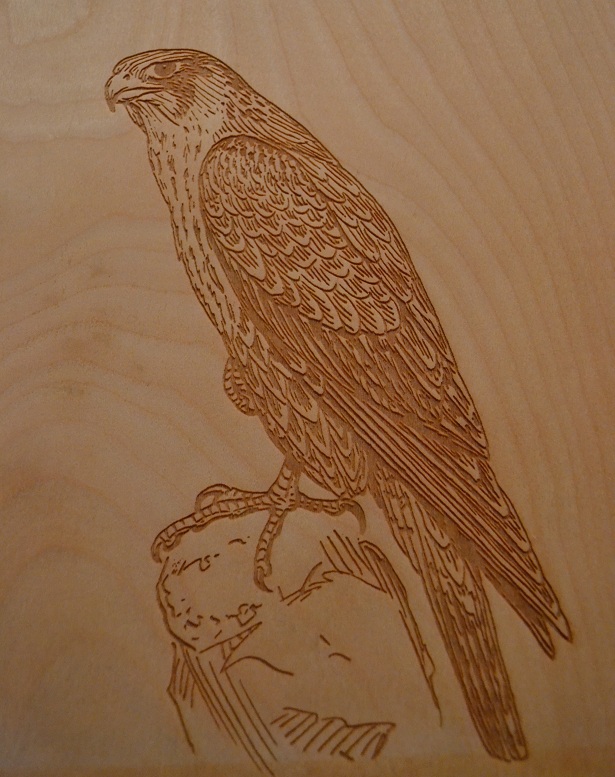
Peregrine Falcon clipboard
100%Power 50%Speed 500dpi

Laser cut thank you note
6%Power 100%Speed Vector Cut

Wednesday, January 11, 2012

Laser Engraved Settlers of Catan Board

One of my favorite lasered works to date is an interlocking Settlers of Catan board game I made for my brother.  Adapted from a design I found on Thingiverse, this set is made from 1/4" poplar and has recessed number tokens and interlocking hexes and ports.


Thursday, December 29, 2011

Laser Cut Sign Language Scrabble Tiles


I made these ASL (American Sign Language) Scrabble tiles as a Christmas gift for my mother.  The full set was laser cut and engraved from 1/8th in birch plywood and have the sign and letter on the same side for those less familiar with finger spelling.  Now all she needs is a board to play on... maybe I can engrave that too?  Merry Christmas Mom!

Saturday, December 17, 2011

Now Shipping Worldwide


With my brother handling marketing and sales, my business-which-has-yet-to-be-officially-started has been doing well.  We currently focus on custom laser cut designs.  Most of this year's work has been in coaster and ornament sales, with ornaments keeping us very busy in the weeks before Christmas.  During the Christmas rush, we saw our first shipments outside the US too!  We're looking forward to an official launch sometime in early 2012.

Thursday, December 8, 2011

Thank you Pinterest...

Thank you Pinterest and Etsy for providing such wonderful ideas for me to copy!  Imitation IS the best form of flattery, right?  My latest lasered creation (found on Pinterest by Caralee Spafford) is a framed Walnut veneer engagement gift.  Congratulations Shannon and Broderick!

Wednesday, December 7, 2011

Making Ornaments on the Laser


The glass ball ornaments I made last Christmas using my Eggbot were well received.  This year I decided to make new designs using my laser cutter.  Above are two finished ornaments I will be selling.  The left is made from 1/8" plywood and the right from 1/8" green Acrylic.  The design I used is from the logo of Mission Hills, Boy Scout Troop 104.

Sunday, August 28, 2011

Laser Cut Miata Visor Blanking Plates


If you're tall and drive a Miata, one of the first things you'll do is remove the sun visors.  Doing so however, leaves the mounting holes exposed.  To make for a cleaner look, I laser cut blanking plates from 1/8" black Acrylic.  E-mail me if you're interested in a pair. $5/pair blank, $15/pair with simple custom logo and/or text.  These will fit years 1999-2005 Mazda MX-5.


Saturday, August 27, 2011

Laser Cutter Cross-hair Guide for under $10

What is it?
Fully adjustable laser cross-hair aiming guide for the FSE 40W laser that can be made using your laser cutter and assembled in less than an hour.

Items you'll need:
2 Red Line Laser Modules Item# 5928 from http://www.dealextreme.com/ $3.96 each
1/8" Acrylic, 3"x3"  (scrap from another project?)
Mounting hardware (I used a pair of screws and nuts on the FSE 40W laser that aren't needed)
Electrical tape
Silicone adhesive (or other glue)
100 Grit sandpaper
Soldering iron/solder

Download and vector cut the SVG file HERE. (Go to File -> Download Original) I used 20% Speed, 100% Power (@ 15ma). You should create a bracket that looks like this:
Unplug the original red laser and unscrew its mounting bracket.  Install the Acrylic bracket as shown below and attached the original red laser mounting bracket to the channel on the right.  I used the machine screws and nuts holding the sheet metal that hides the Retina Engrave Card to mount the Acrylic bracket (any small nut and bolt should work fine).
Remove the "line forming" lens from one of the two line lasers (just unscrew the cap) and glue it to the original FSE red dot laser with the smooth side out, being careful to not obscure the path of the laser with glue.  Solder the terminals of the second line laser to those of the FSE red dot laser (red to red, black to black).  Your lasers should look like this.
To achieve a narrower line, mask each lens with electrical tape leaving a small slit in the center.  This will create a more precise cross-hair.  Position the slit perpendicular to the direction of the grooves on the lens.  Cut off the extra tape.
The hole on the bracket is undersized so that with a small amount of sanding you can press fit the line laser into the hole.  Use your 100 grit sandpaper to open the hole just enough to press in the line laser.  This should be a tight fit.  Mount the original FSE red laser (now with attached line lens) in it's original bracket.
By adjusting the four screws, you'll be able to align the X and Y axis lasers to cross where the cutting beam meets the material, regardless of the height of the material.  This performs the same job (or better) than the $300 beam combiner offered from FSE.

This project was inspired by Rich Olson's work at Nothing Labs: http://nothinglabs.blogspot.com/2011/06/20-laser-cutter-crosshair-aiming-system.html

Friday, August 19, 2011

Inkscape for CNC: Part 1


I was introduced to Inkscape when I first began using my Eggbot.  Inkscape is "an Open Source vector graphics editor, with capabilities similar to Illustrator, CorelDraw, or Xara X, using the W3C standard Scalable Vector Graphics (SVG) file format."  What's so important about this, you may ask?  Two reasons.  First, Inkscape creates vector graphics in a format many CNC (computer numerical control) devices like the Eggbot or laser cutters can interpret to cut, engrave, or draw your designs.  Secondly, because Inkscape is Open Source it's free and available for anyone to download and work with!

Unlike your typical paint and pencil graphics programs (think MS Paint), vector graphics programs can be somewhat challenging to use as they're not entirely intuitive.  Quite a few excellent tutorials can already be found on the Inkscape Tutorials Page. The tutorial I'll be presenting here is specifically geared towards creating or preparing graphics to be used with cnc devices.  As with any relatively complex program, it will take time before you can become proficient, but this tutorial should help with the first steps.

You can watch the first part below.

Saturday, August 6, 2011

First Production Run with the Laser Cutter

I gave my brother a few sample coasters for the Boy Scout camp Emerald Bay to see if anyone there would be interested in purchasing them.  Later that day, he sent me a text message:

Just spoke with the camp director and showed him some product. He is very impressed and said as soon as I get to camp I should have a chat with the business director. His first question was, "How fast can you produce these?"
So for the next two weeks I worked on a limited run of coasters, wall hangings, and ornaments as my schedule permitted. My bedroom has a lingering smell of bonfire because the exhaust fan I'm using is slightly less than adequate. While it's unlikely I'll make back the cost of the laser cutter for quite some time, I'm excited to see how well these items sell. It's fun to have your designs purchased, even if you aren't turning much of a profit.

Tuesday, July 26, 2011

Unfinished gifts and items for purchase

    I recently finished lasering a set of wood coasters (as a gift) as well as my first coasters for resale.  After lasering, wood requires a bit of sanding to remove the smoke stains caused from the burning material and it also needs to be varnished to protect the surface.  There are products such as LiquaMask that prevent stains from depositing on the working material during cutting and engraving, but for wood that could use a bit of sanding anyways, it's really not cost effective.  If I begin to work with more costly or delicate materials, preventing these stains from forming will become more important.   I was originally having some trouble preventing burn marks on the underside of the coasters (caused from a reflection of the laser after cutting through the material), but this was easily prevented by placing card stock beneath the wood.  I also happened to discover that colder wood cuts easier and engraves better than room temperature wood.  I'll be exploring this further on future projects.

Set of four unfinished Red Oak coasters
Oak and Poplar unfinished coasters to be sold

Thursday, July 14, 2011

Laser Cutter Settings and Experimentation

     When a boy gets a new toy it's a guarantee he'll push it to it's limits.  He'll build the tallest Lego tower possible, race his RC car through the deepest puddle, ride his bike off the highest curb, it's just what young boys do.  When he grows up this doesn't change much.  Really, the only difference is his toys.
     Similar to Tom at Will it Blend?, I've been seeing what cuts and what doesn't with my laser. I've been cutting and engrave anything I can get my hands on, with mixed success.  To keep track of the materials and settings I've tried, I put together a Google Docs spreadsheet.  This should serve as a good reference for future projects and a way to share my work with others.

Failed attempt to engrave a Lightscribe CD with a CO2 laser
     One recent test I performed was to try engraving on a Lightscribe CD.  In the proper computer CD drive, these special CDs can be flipped over to their backside and "printed" on using the drive's very own laser.  Great idea, but as it turns out an incredibly slow process.  Why not use the laser cutter to speed things up?  I prepared a CD alignment guide cut from a piece of cardboard and set the cutter to 100% speed, 1% power (the weakest setting).  The 40W laser easily burned through the data layer of the CD even at these low settings.  I thought about further reducing the power by manually limiting power to the machine, but it's probably better to stick with the original method of using these CDs.  Lesson learned.

Tuesday, July 12, 2011

Good, but not too good...

The Virgin Mary (carbon on taco-sized flour tortilla)
    Having begun to get acquainted with vector cutting and engraving on my FSE 40W laser, I branched into using the raster mode today.  For lack of better materials, I decided to print on a tortilla and later a slice of bread.  What better image to print than that of the Holy Virgin?  After all, I might even sell it for $28,000.  Here's a video of the laser in action.


Wednesday, July 6, 2011

Ushering in the Era of Home Manufacturing

Vector Engrave on 1/4" plywood at 80% Power / 20% Speed (15ma limit on FSE 40W laser)
    If one were to glace around my 11'x11' bedroom in Santa Paula, it might seem more like a workshop than a living space.  My recently acquired laser cutter takes up a good portion of my room alongside the sewing machine, eggbot, and soldering station to name a few other tools laying about.  I'm still learning how to manipulate power and speed for the best results with the cutter and hope to post my findings/examples here for other laser users or anybody curious to see what I've been putting together.

    Here's an excerpt from a report to the White House regarding the emergence of home manufacturing.

Personal manufacturing is where personal computing was in the 1970s, before the advent of home-scale computers and consumer software. Recent rapid technological advances in personal manufacturing technology, combined with shrinking costs of machines, increasingly available design software and raw manufacturing materials, plus most peoples’ tendency to conduct more daily activities online, are tipping personal fabrication from the realm of hobbyists and pioneers to the mainstream.


    The full document can be found here.